
Google Ads can be one of the fastest ways to reach people who are actively searching for your products or services.
Unlike many traditional forms of advertising, Google Ads allows businesses to target people based on what they search for, where they are located, what device they use, and other relevant signals.
However, getting traffic is not the same as getting profitable customers.
Many businesses start a campaign, choose a few keywords, create advertisements, set a daily budget, and expect leads or sales to arrive automatically. When the results do not meet expectations, they often assume that Google Ads is too expensive.
In reality, the problem may not be the advertising platform itself.
The problem could be poor keyword targeting, missing negative keywords, weak ad copy, incorrect conversion tracking, irrelevant landing pages, unsuitable bidding strategies, or a lack of regular optimization.
A campaign can receive hundreds of clicks and still produce very few valuable enquiries.
That is why managing your Google Ads budget requires more than simply choosing keywords and setting a daily spending limit.
You need to understand where your money is going, which searches are generating traffic, which visitors are becoming customers, and which parts of your campaign need improvement.
In this guide, we will discuss 7 costly Google Ads mistakes that can waste your advertising budget.
You will also learn practical ways to identify these problems, improve campaign performance, and make better use of your existing advertising budget.
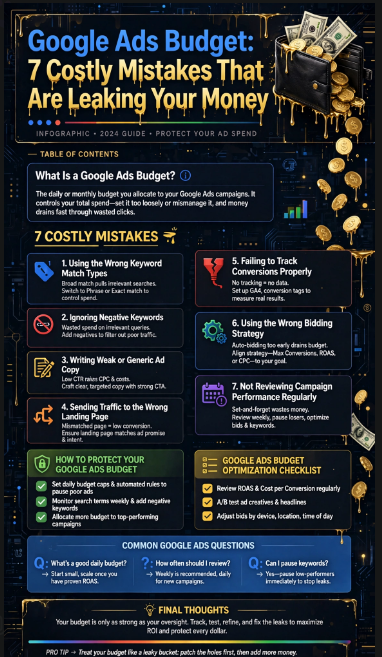
Table of Contents
- What Is a Google Ads Budget?
- Using the Wrong Keyword Match Types
- Ignoring Negative Keywords
- Writing Weak or Generic Ad Copy
- Failing to Track Conversions Properly
- Sending Traffic to the Wrong Landing Page
- Using the Wrong Bidding Strategy
- Not Reviewing Campaign Performance Regularly
- How to Protect Your Google Ads Budget
- Google Ads Budget Optimization Checklist
- Common Google Ads Questions
- Final Thoughts
What Is a Google Ads Budget?
A Google Ads budget is the amount of money an advertiser is willing to allocate toward advertising campaigns.
For example, a business might decide to spend ₹500, ₹1,000, ₹2,000, or ₹5,000 per day depending on its objectives, market, competition, and expected return.
However, setting a budget is only one part of successful advertising.
A business could spend ₹1,000 per day and generate several qualified leads.
Another business could spend the same amount and receive mostly irrelevant clicks.
The difference often comes down to campaign structure and optimization.
Your advertising objective should therefore not simply be:
“How can I spend my budget?”
Instead, the question should be:
“How can I use my budget to attract the right potential customers?”
This distinction is extremely important.
A low-cost click is not automatically a valuable click.
Similarly, a high number of clicks does not automatically mean that your campaign is successful.
A useful advertising strategy considers the complete journey:
Keyword → Ad → Click → Landing Page → Conversion → Customer
If one part of this journey is poorly optimized, your advertising spend may become less efficient.
1. Using the Wrong Keyword Match Types
One of the most common reasons a Google Ads budget gets wasted is poor keyword targeting.
Keywords tell Google when your advertisement may be eligible to appear.
However, not every search containing similar words represents the same customer intent.
For example, suppose you operate a business that sells premium running shoes.
You may target searches related to:
- Buy running shoes
- Best running shoes
- Running shoes for men
- Running shoes online
- Premium running shoes
These searches can indicate commercial intent.
But a broad targeting approach may also expose your ads to searches that are less relevant to your business.
Someone might search for:
- Running shoe repair
- Used running shoes
- Free running shoes
- Running shoe jobs
- Running shoe design
- Running shoes meaning
Depending on your business, these searches may not be useful.
If your advertisement receives clicks from people who are unlikely to purchase, your Google Ads budget can disappear without generating meaningful business results.
Understanding Match Types
Google Ads provides different keyword matching approaches.
Broad match can provide wider reach and help discover additional searches.
Phrase match provides more control over relevance while still allowing variations around the keyword.
Exact match generally provides greater control over the type of search that can trigger an advertisement, although matching is not necessarily limited to an identical sequence of words.
The appropriate choice depends on the campaign objective, data, conversion tracking, and optimization strategy.
The important point is not to select a match type simply because someone says it is always better.
Instead, monitor the actual searches generated by your keywords.
How to Fix This Problem
Start by reviewing the Search Terms Report.
Look at the searches that actually triggered your advertisements.
Ask:
- Is the search relevant?
- Does the person appear to have buying intent?
- Can my business satisfy this search?
- Is this search likely to produce a lead or sale?
- Should this search be excluded?
If you find irrelevant traffic, consider adding appropriate negative keywords.
This simple process can help protect your Google Ads budget from unnecessary clicks.
2. Ignoring Negative Keywords
Negative keywords are an important part of managing a Google Ads budget.
They help prevent your advertisements from appearing for searches that are not relevant to your business.
Imagine you operate a paid digital marketing training institute.
You may want to attract people searching for:
- Digital marketing course
- Digital marketing training
- Google Ads course
- SEO course
- Social media marketing course
But you may not want to pay for searches such as:
- Digital marketing jobs
- Digital marketing salary
- Free digital marketing course
- Digital marketing PDF
- Digital marketing internship
A person searching for a job may not be looking for a paid course.
A person searching specifically for a free PDF may also have a different intent from someone ready to purchase training.
Without appropriate negative keyword management, your campaign may spend money on these searches.
Build a Negative Keyword Strategy
Create a list of irrelevant terms based on your actual business.
Depending on your industry, potential negative keywords could include:
- free
- jobs
- salary
- internship
- definition
- meaning
- download
- template
However, do not add negative keywords automatically.
Always consider the intent behind the search.
For example, the word “free” may be irrelevant for one business but valuable for another business that offers a free consultation or free trial.
The goal is not to block as much traffic as possible.
The goal is to block irrelevant traffic.
You can find official information about Google Ads keyword targeting and negative keywords through the Google Ads Help Center.
External Link Placement: Add a DoFollow link on the anchor text Google Ads Help Center to the relevant official Google Ads documentation.
3. Writing Weak or Generic Ad Copy
Your advertisement is often the first thing a potential customer sees after searching.
If your ad is vague, generic, or disconnected from the user’s intent, your campaign may struggle to attract qualified clicks.
Consider these two examples.
Generic Advertisement
Digital Marketing Services
Professional digital marketing services for businesses.
Benefit-Focused Advertisement
Get More Leads With Google Ads
Reach high-intent customers with targeted campaigns designed around measurable business goals.
The second example communicates a clearer benefit.
Your advertisement should help the searcher quickly understand:
- What you offer
- Who you help
- What benefit you provide
- Why they should consider your business
- What action they should take
Improve Your Google Ads Copy
When writing ad copy, focus on the customer’s problem.
Instead of simply saying:
“We provide SEO services.”
You could communicate a stronger benefit:
“Improve Your Search Visibility”
Then support it with a relevant description.
For example:
Grow your online visibility with practical SEO strategies, technical optimization, and content designed around search intent.
The message should remain accurate.
Avoid making unrealistic guarantees such as promising a specific ranking, exact number of leads, or guaranteed revenue unless you can genuinely substantiate the claim.
Test Different Messages
Do not assume that your first advertisement will be your best advertisement.
Test different approaches around:
- Benefits
- Features
- Offers
- Calls to action
- Customer problems
- Service categories
- Location
- Trust signals
For example, one ad may focus on affordability while another focuses on expertise.
Your campaign data can then help you understand which messaging attracts better results.
Better ad relevance can also contribute to a better user experience.
4. Failing to Track Conversions Properly
Conversion tracking is one of the most important parts of managing a Google Ads budget.
Imagine that your campaign generates 20 genuine enquiries.
But your conversion tracking is incorrectly configured and reports zero conversions.
You may conclude that the campaign is failing.
You could then pause the campaign even though it is producing valuable leads.
The opposite can also happen.
Suppose every page view is accidentally counted as a conversion.
Your campaign may appear to be generating hundreds of conversions even though very few people are actually becoming customers.
In both cases, the data becomes unreliable.
What Should You Track?
Your conversion actions depend on your business model.
Potential conversions include:
- Contact form submissions
- Phone calls
- WhatsApp enquiries
- Purchases
- Account registrations
- Quote requests
- Appointment bookings
- Demo requests
- Course registrations
- Newsletter sign-ups
Not every action has equal business value.
For example, a purchase may be more commercially important than a simple page view.
A qualified sales enquiry may be more valuable than someone downloading a free document.
Check Your Tracking Setup
Review whether the important actions are being recorded correctly.
You can also use Google Analytics to understand what visitors do after arriving on your website.
External Link Placement: Add a DoFollow link on Google Analytics pointing to the official Google Analytics website.
The key principle is simple:
Do not optimize your advertising based on unreliable data.
Before making major changes to your Google Ads budget, make sure your conversion measurement is working properly.
5. Sending Traffic to the Wrong Landing Page
Getting a click is only the beginning.
The visitor still needs to take an action after reaching your website.
This is where many businesses lose potential customers.
Imagine your advertisement says:
50% Off Digital Marketing Course – Enrol Today
But clicking the advertisement sends the user to your general homepage.
The visitor may have to:
- Find the course section
- Search for the correct course
- Read several pages
- Find the registration option
- Understand the offer
- Decide whether to continue
Every additional step creates friction.
The person may simply leave.
Create Relevant Landing Pages
Your landing page should closely match the advertisement.
If you advertise a specific service, send users to the relevant service page.
If you advertise a specific course, send users to the course page.
If you advertise a property, send users to the relevant property or enquiry page.
A useful landing page can include:
- Clear headline
- Relevant offer
- Benefits
- Important features
- Trust signals
- Testimonials
- Reviews
- Supporting images
- Simple contact form
- Strong call to action
- Mobile-friendly layout
Maintain Message Consistency
There should be a logical connection between the:
Keyword → Advertisement → Landing Page
For example:
Keyword: Digital Marketing Course
Ad: Learn Digital Marketing With Practical Training
Landing Page: Digital Marketing Course – Curriculum, Fees, Benefits and Enrolment
This consistency helps visitors immediately understand that they have reached the correct destination.
A well-designed landing page can therefore make better use of the traffic generated by your Google Ads budget.
6. Using the Wrong Bidding Strategy
Bidding is another area that can influence how your advertising budget is used.
Google Ads provides different bidding approaches designed around different campaign objectives.
Your choice should therefore start with a simple question:
What do I actually want from this campaign?
If your goal is website traffic, you may focus on visits.
If your goal is leads, you should focus on qualified conversions.
If your goal is online sales, purchase-related conversions and their value become particularly important.
If your goal is awareness, reach and visibility may be more relevant.
Don’t Optimize for the Wrong Metric
Imagine that your actual business objective is to generate leads.
You could receive 500 clicks and feel that the campaign is successful.
But what if those 500 clicks generate only one qualified enquiry?
Now imagine another campaign receives 100 clicks but produces ten qualified leads.
Looking only at traffic would hide the difference.
This is why you should connect your bidding strategy and campaign optimization with the actual business objective.
Allow Data to Guide Decisions
Do not change bidding strategies repeatedly without allowing campaigns enough time and data to provide useful information.
Frequent changes can make performance analysis more difficult.
Instead:
- Define the objective.
- Configure accurate conversion tracking.
- Select an appropriate strategy.
- Monitor performance.
- Analyze conversion quality.
- Make controlled changes.
The goal is not simply to obtain cheap clicks.
The goal is to use your Google Ads budget to generate meaningful business outcomes.
7. Not Reviewing Campaign Performance Regularly
Launching a campaign and never reviewing it can be an expensive mistake.
Your market can change.
Your competitors can change.
Search behavior can change.
Costs can change.
New search terms can appear.
Some advertisements can perform better than others.
Because of this, campaign management should be an ongoing process.
What Should You Review?
Regularly examine:
- Click-through rate
- Conversion rate
- Cost per conversion
- Search terms
- Keyword performance
- Ad performance
- Device performance
- Location performance
- Audience performance
- Landing page performance
- Conversion quality
- Budget allocation
Do not judge performance using clicks alone.
For example:
Keyword A: 100 clicks, 0 leads
Keyword B: 20 clicks, 5 leads
Keyword A generated more traffic.
But Keyword B generated more leads.
The business value of the traffic therefore requires deeper analysis.
Review Search Terms
Search Terms Reports can reveal what people actually searched before clicking your advertisements.
This information can help you:
- Discover new relevant keywords
- Find irrelevant searches
- Add negative keywords
- Understand customer language
- Improve ad copy
- Improve landing page messaging
This is one of the practical ways to make your Google Ads budget more efficient.
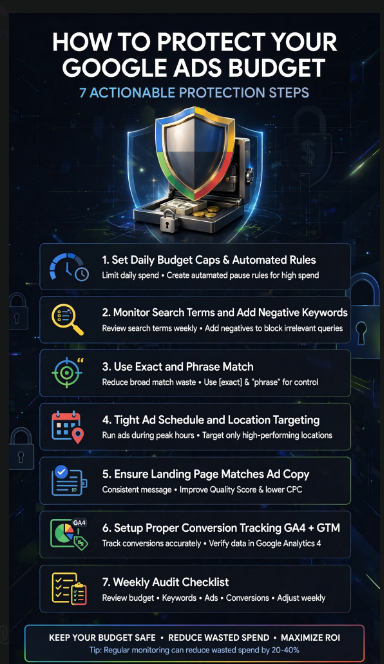
How to Protect Your Google Ads Budget
Now that we have covered the seven major mistakes, let’s create a simple optimization system.
Step 1: Review Search Terms
Look at the actual searches generating clicks.
Identify searches that are irrelevant, low-intent, or unrelated to your offer.
Step 2: Add Relevant Negative Keywords
Create negative keyword lists based on real search data.
Do not block valuable searches simply because they look different from your original keyword list.
Step 3: Improve Your Advertisements
Review your headlines and descriptions.
Ask whether your advertisement clearly communicates:
- The service
- The customer benefit
- The unique value
- The next action
Step 4: Verify Conversion Tracking
Test important conversion actions.
Make sure forms, calls, purchases, and other valuable actions are being measured correctly.
Step 5: Review Landing Pages
Check whether visitors are being sent to the most relevant page.
Remove unnecessary steps.
Make the CTA easy to find.
Step 6: Analyze Cost Per Conversion
Do not focus only on clicks.
Review how much you are spending to generate a qualified lead, sale, or other meaningful conversion.
Step 7: Reallocate Budget Carefully
If one campaign consistently generates higher-quality results while another consumes budget without producing useful outcomes, investigate why.
Potentially adjust budget allocation after considering conversion quality, margins, sales value, and other business factors.
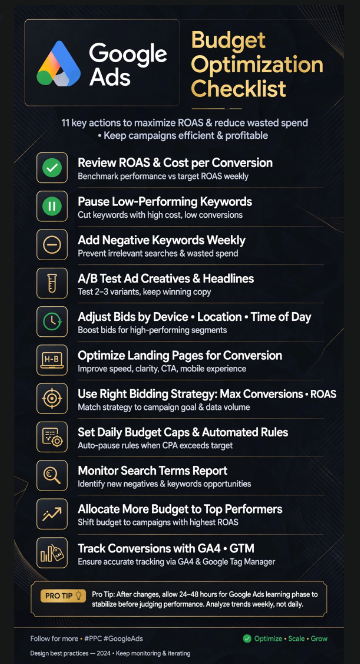
Google Ads Budget Optimization Checklist
Before increasing your advertising spend, use this checklist:
| Area | What to Check |
|---|---|
| Keywords | Are your keywords relevant to your offer? |
| Match Types | Are you controlling search intent appropriately? |
| Negative Keywords | Are irrelevant searches being excluded? |
| Ad Copy | Does your advertisement communicate a clear benefit? |
| Conversion Tracking | Are important actions recorded correctly? |
| Landing Page | Does the page match the advertisement? |
| Bidding | Does the strategy support your campaign objective? |
| Search Terms | Are actual searches reviewed regularly? |
| Budget | Is spending aligned with business priorities? |
| Reporting | Are you measuring meaningful results? |
| Devices | Are mobile and desktop results being reviewed? |
| Locations | Are you targeting the right geographical areas? |
| Ad Performance | Are you testing different messages? |
| Lead Quality | Are leads actually relevant to your business? |
Use this checklist before simply increasing your daily Google Ads budget.
More spending does not automatically solve a campaign problem.
Sometimes better targeting and better measurement can be more useful than simply spending more.
Internal Linking Strategy
Internal links help visitors discover related information on your website.
They can also help search engines understand the relationship between different pages on your site.
For this article, consider adding internal links to relevant pages such as:
- Google Ads Campaign Setup Guide
- Keyword Research Guide
- Digital Marketing Services
- SEO Services
- Landing Page Optimization Guide
- Conversion Rate Optimization Guide
- Contact Us
For example, within a paragraph about keyword targeting, you can naturally link the phrase Keyword Research Guide to your relevant website page.
Similarly, when discussing conversion tracking, you can link Digital Marketing Services to your relevant service page.
Do not add internal links randomly.
The linked page should genuinely help the reader understand the topic further.
External Linking Strategy
External links can provide additional information and help readers access authoritative resources.
For a Google Ads article, useful external resources can include:
- Google Ads Help Center
- Google Ads official website
- Google Analytics
- Google Tag Manager
- Google Search documentation
Use descriptive anchor text rather than generic phrases such as “click here.”
For example:
Better: Learn more about Google Ads keyword targeting.
Less useful: Click here.
When adding external resources in WordPress, check the link settings and ensure that you have not accidentally added nofollow if your SEO strategy specifically requires a standard DoFollow link.
However, DoFollow links should be used because the resource is genuinely useful—not simply because you want to manipulate search rankings.
Common Google Ads Questions
How much should I spend on Google Ads?
There is no universal budget that works for every business.
Your budget can depend on your industry, location, competition, average customer value, conversion rate, margins, and campaign objective.
A business selling a high-value service may have different economics from a business selling low-cost products.
Start with a budget that you can monitor and evaluate properly.
Then use conversion and business data to make informed adjustments.
Why is my Google Ads budget spending so quickly?
Fast spending can have several possible causes.
Your campaign may be targeting a broad audience, using broad keywords, receiving high-cost clicks, targeting a large geographical area, or attracting searches that are not relevant to your business.
Review search terms, keyword targeting, locations, devices, bidding, and daily budget settings.
Do not assume that fast spending automatically means the campaign is performing badly.
Look at what results that spending is producing.
Why am I getting clicks but no leads?
Clicks indicate that people interacted with your advertisement.
They do not guarantee that visitors will become leads.
Possible reasons include:
- Poor landing page
- Weak offer
- Incorrect targeting
- Low buying intent
- Complicated form
- Slow website
- Poor mobile experience
- Weak CTA
- Incorrect conversion tracking
Review the entire journey from search to conversion rather than focusing only on clicks.
Should I increase my Google Ads budget?
Increasing your budget should be based on campaign data and business economics.
Before increasing spending, check whether your existing traffic is relevant and whether important conversions are being tracked correctly.
If your campaign is attracting irrelevant traffic, increasing the budget could simply increase wasted spending.
Fix targeting and measurement issues first.
Are Google Ads expensive?
The cost of Google Ads varies significantly depending on the industry, competition, keyword, location, audience, and campaign objective.
Some searches can be relatively inexpensive while competitive commercial keywords can cost considerably more.
Instead of asking only whether a click is expensive, consider the value generated by the resulting customer.
For example, a relatively expensive click may still be commercially useful if it contributes to a profitable customer acquisition.
How to Build a Smarter Google Ads Strategy
A successful advertising strategy should connect your campaign with your overall marketing funnel.
Think about the following structure:
Search Intent
↓
Relevant Keyword
↓
Compelling Advertisement
↓
Relevant Landing Page
↓
Clear Call to Action
↓
Conversion
↓
Qualified Lead or Customer
Every stage matters.
If the keyword is wrong, you may attract the wrong visitor.
If the advertisement is weak, fewer relevant people may click.
If the landing page is poor, visitors may leave.
If tracking is incorrect, you may not understand what is actually working.
If your follow-up process is slow, even good leads may fail to become customers.
Therefore, managing a Google Ads budget should not be treated as simply buying clicks.
It should be treated as managing a complete customer acquisition process.
A Simple Weekly Google Ads Routine
For small businesses, creating a regular review routine can make campaign management easier.
Monday: Search Terms
Review actual searches and identify irrelevant traffic.
Tuesday: Keywords
Review keyword performance, match types, and negative keyword opportunities.
Wednesday: Advertisements
Compare ad performance and look for opportunities to improve messaging.
Thursday: Conversions
Check whether forms, calls, purchases, and other conversion actions are being tracked correctly.
Friday: Landing Pages
Review the pages receiving paid traffic.
Check their relevance, speed, mobile usability, CTA, and overall user experience.
Weekend: Overall Performance
Review:
- Spend
- Leads
- Sales
- Cost per conversion
- Lead quality
- Revenue
- Campaign-level performance
This routine does not mean you must make changes every day.
The purpose is to understand what is happening before making decisions about your Google Ads budget.
Signs That Your Google Ads Budget May Be Wasted
Look for warning signs such as:
High Clicks but No Leads
This may indicate targeting, landing page, offer, or conversion issues.
Many Irrelevant Search Terms
This can indicate that keyword targeting needs attention.
Very Low Conversion Rate
Review the entire customer journey.
High Cost Per Lead
Investigate keyword competition, targeting, conversion rate, and lead quality.
Leads but No Sales
The advertising campaign may not be the only issue.
Your sales process, lead qualification, pricing, offer, or follow-up process may also need attention.
Conversion Numbers That Look Too Good
Unexpectedly high conversion numbers can sometimes indicate tracking problems.
Always compare platform data with actual business outcomes.
What Not to Do With Your Google Ads Budget
Avoid these common habits:
Do Not Increase Spending Just Because Results Are Poor
More money cannot automatically fix poor targeting.
Do Not Pause Everything After One Bad Day
Advertising performance can fluctuate.
Look at meaningful patterns rather than reacting emotionally to short-term changes.
Do Not Judge Campaigns Only by CTR
A high click-through rate does not automatically mean profitable customers.
Do Not Ignore Lead Quality
Ten low-quality leads may be less valuable than two highly qualified prospects.
Do Not Forget Mobile Users
Many people interact with advertisements through mobile devices.
Make sure your landing pages and forms work properly on smaller screens.
Do Not Make Too Many Changes at Once
If you change keywords, bidding, ads, targeting, budget, and landing pages simultaneously, it becomes harder to understand which change affected performance.
Make controlled changes whenever possible.
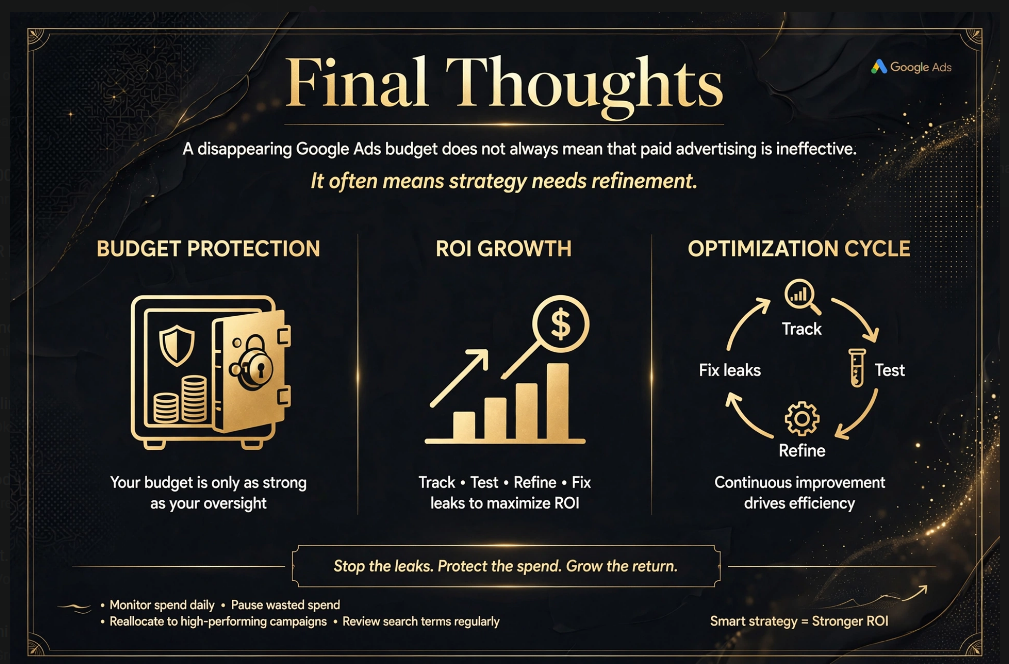
Final Thoughts
A disappearing Google Ads budget does not always mean that paid advertising is ineffective.
In many situations, the problem is related to campaign structure, targeting, tracking, landing pages, bidding, or optimization.
The seven mistakes discussed in this guide can all affect how efficiently your advertising money is used.
Wrong keyword targeting can bring irrelevant visitors.
Missing negative keywords can increase unnecessary clicks.
Weak ad copy can reduce the quality of engagement.
Incorrect conversion tracking can make your data unreliable.
Poor landing pages can lose visitors after they click.
An unsuitable bidding strategy can make it harder to optimize toward your actual business objective.
And failing to review campaign performance can allow problems to continue unnoticed.
The solution is not necessarily to spend more.
Instead, focus on understanding where your existing Google Ads budget is going and what business results it is producing.
Review your search terms.
Improve keyword targeting.
Add relevant negative keywords.
Test your advertisements.
Verify conversion tracking.
Optimize your landing pages.
Review bidding strategies.
Monitor campaign performance regularly.
Most importantly, measure the outcomes that actually matter to your business.
The goal of Google Ads is not simply to generate the maximum number of clicks.
The goal is to attract the right people, provide them with a relevant experience, and create opportunities for valuable business results.
A carefully managed Google Ads budget can therefore become a more strategic part of your overall digital marketing plan.
Before increasing your spending, first make sure your existing campaigns are targeting the right audience, tracking the right actions, and sending visitors to relevant destinations.
Spend smarter, measure carefully, and optimize continuously.
That is the foundation of a more efficient Google Ads strategy